LCD vs LED & Eye Strain: Which Screen Is Actually Easier on Your Eyes?
Short version: the "LCD vs LED" label is not the thing deciding whether your eyes feel tired after a long binge. Brightness, flicker, glare and your own habits matter far more. Let's unpack it properly — no fear-mongering, just what the research actually says.
01 LCD vs LED: what's the real difference?
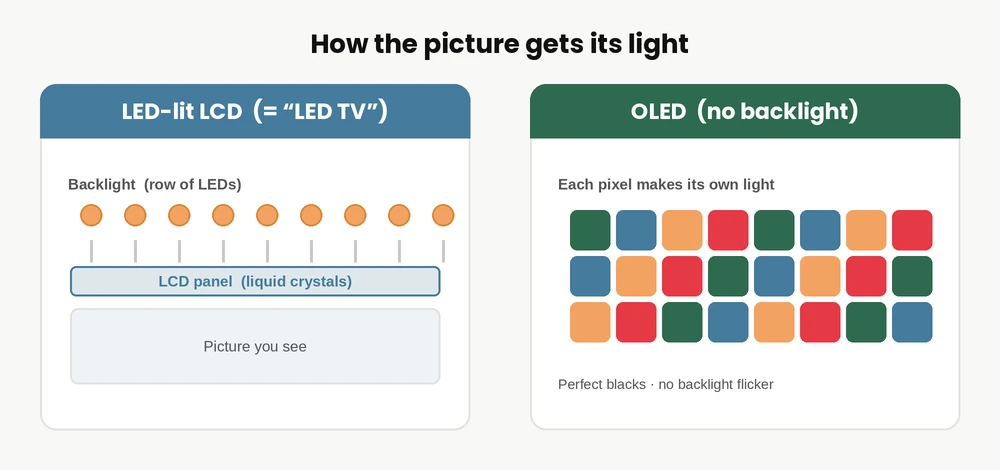
Here's the plot twist that saves you a lot of confusion: an "LED TV" is an LCD TV. They both build the picture the same way — a layer of liquid crystals that twist to let light through and form pixels. The only difference is what lights that layer from behind.
- Old-school LCD used fluorescent (CCFL) tubes as the backlight — bulkier, warmer-running, dimmer.
- "LED" TVs are the same LCD panels lit by tiny LEDs instead — thinner, brighter, more energy-efficient, with better contrast.
So when a shop lists a "LED TV," read it as "an LCD TV with a modern LED backlight." Every TV you'll realistically buy today in this class is LED-backlit. The genuinely different technology — where each pixel makes its own light — is OLED, which we'll get to.
02 So does LCD or LED cause more eye strain?
Honest answer: the LCD-vs-LED label barely matters for your eyes. Since a modern "LED" TV is just an LED-lit LCD, you're mostly comparing old backlight tech to new backlight tech — and the newer LED-lit screens are generally easier on the eyes simply because they're brighter, sharper, higher-contrast and far more adjustable.
What genuinely decides whether your eyes ache isn't the acronym on the box. It's four things: how the screen flickers, how bright it is versus your room, how much glare it throws, and how you use it. A great panel used badly will tire your eyes; a modest panel set up well will feel fine.
03 What actually causes digital eye strain
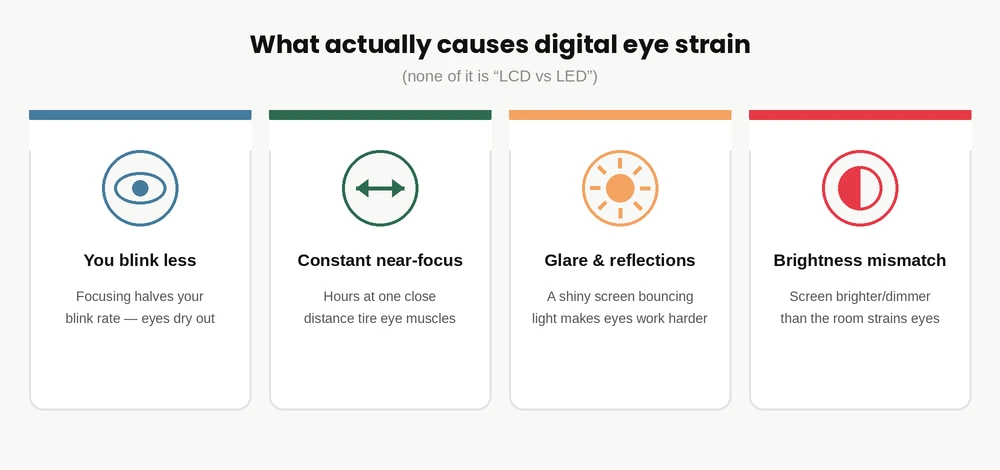
Digital eye strain (doctors call it computer vision syndrome) is very real — a large 2023 meta-analysis of over 66,000 people put its prevalence around 69% among heavy screen users. [4] But the causes are surprisingly low-tech:
- You blink less. Focusing on a screen roughly halves your blink rate and leaves many blinks incomplete, so your eyes dry out. [3]
- Constant near-focus. Holding focus at one close distance for hours fatigues the muscles that focus your eyes. [2]
- Glare and reflections. A shiny screen bouncing a window or light fixture forces your eyes to work harder. [5]
- Brightness mismatch & posture. A screen much brighter (or dimmer) than the room, sitting too close, or a bad viewing angle all add up.
04 The blue light myth (what research really shows)
This is where a lot of blogs — and product marketing — quietly mislead you. So let's be precise about what's myth and what's real.
And those blue-light-blocking glasses? A 2023 Cochrane review — the gold standard, pooling 17 randomised trials — found they probably make no meaningful difference to eye strain, and the evidence for better sleep is inconclusive. [6] If they help you, great, but don't expect miracles.
The part that is real: bright, blue-rich light in the evening can suppress melatonin and nudge your body clock, making it harder to wind down. That's a sleep issue, not an eye-damage issue — and you fix it by dimming screens and using warm/night mode at night, not by fearing your TV.
05 Flicker: the eye-comfort factor nobody talks about
If you want the one genuinely screen-related thing that affects comfort, it's flicker — specifically, how a screen dims its brightness. Many screens lower brightness using PWM (pulse-width modulation): instead of truly dimming, they flash the light on and off very fast. You usually can't see it, but roughly 10–30% of people are sensitive and get headaches, tired eyes or even queasiness — especially at low brightness where the flashing is most aggressive. [7]
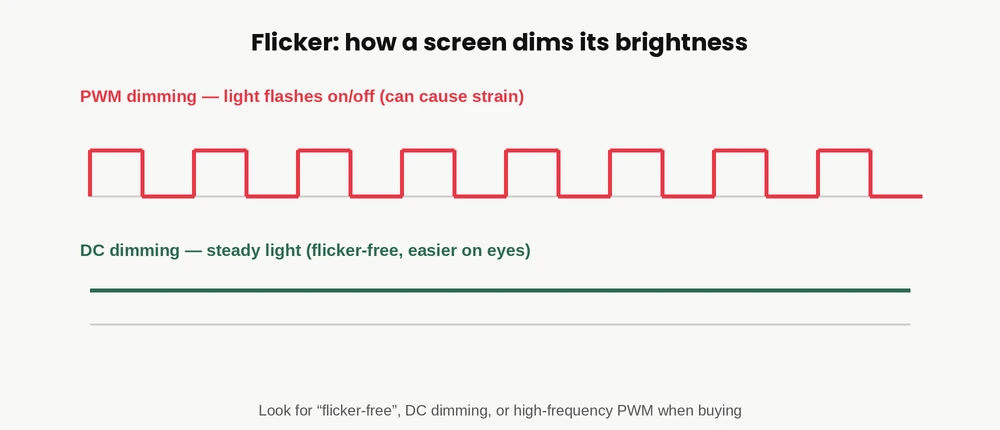
How to sidestep it when buying: look for screens described as "flicker-free," with DC dimming, or high-frequency PWM. And a simple habit helps a lot — don't run a screen at rock-bottom brightness in a dark room; raise the room light and keep the screen at a moderate level instead.
06 Where do OLED and QLED fit in?
Two names you'll see on nicer TVs — here's the eye-comfort take on each:
- QLED is still an LED-lit LCD, but with a quantum-dot layer that boosts brightness and colour. Because these run bright and often dim cleanly, many people find them very comfortable for daytime rooms.
- OLED lights each pixel individually, giving perfect blacks and gorgeous contrast — and since there's no backlight, it avoids classic backlight flicker. The catch: some OLED panels use their own PWM, so a flicker-sensitive minority can still feel strain. If that's you, look for high-PWM or DC-dimming OLEDs. [7]
07 How to set up any screen for comfortable eyes
Whatever you own, these evidence-based habits do more for your eyes than any panel upgrade:
Eye-comfort checklist
- Match brightness to the room — the screen shouldn't glow like a torch in the dark or look dull in daylight.
- Kill glare — angle the screen away from windows and lights; a matte finish helps.
- 20-20-20 — every 20 min, look 20 ft away for 20 sec. Blink on purpose.
- Mind the distance — sit back a bit; for a TV, several feet, not right on top of it.
- Warm/night mode after sunset — for better sleep, not because blue light "burns" your eyes.
- Get your eyes checked — uncorrected vision is a huge hidden cause of strain no setting can fix.
08 Which screen should you actually buy?
| If you want… | Best pick | Why it's easy on the eyes |
|---|---|---|
| Best value, everyday room | LED-lit LCD (HD/4K) | Bright, sharp, adjustable — set it up well and it's genuinely comfortable |
| Bright living room, rich colour | QLED | High brightness handles daylight; typically clean, steady dimming |
| Movies, dark-room contrast | OLED | Per-pixel light, no backlight flicker; check for high-PWM/DC dimming if sensitive |
The takeaway: don't agonise over "LCD or LED." Pick the right size and resolution for your room, favour a flicker-free screen, and set the brightness sensibly. That combination beats any label on the box. Not sure about size? Read our 32 inch vs 43 inch comparison guide or our 5 things to check before buying a smart TV.
Shopping for a screen that's kind to your eyes? At Tanish Electronics we stock bright, sharp LED & smart TVs built for real Indian living rooms — with genuine, authentic products, COD, free shipping and warranty support, so you buy with confidence.
🛒 Browse Smart TVs at Tanish Electronics →09 Frequently Asked Questions
Is LED or LCD better for your eyes?
They're basically the same technology — an "LED" TV is an LCD with an LED backlight. Modern LED-lit screens tend to be easier on the eyes because they're brighter, sharper and more adjustable. Comfort depends far more on flicker, brightness, glare and habits than on the LCD-vs-LED label.
Does blue light from a TV or phone damage your eyes?
According to the American Academy of Ophthalmology, there's no scientific evidence that the light from screens damages your eyes, and screens emit blue light well below harmful levels. Evening blue light can affect sleep, but that's a body-clock issue, not eye damage.
Do blue light glasses actually reduce eye strain?
The best available evidence — a 2023 Cochrane review of 17 trials — found they probably make no meaningful difference to eye strain, with inconclusive results for sleep. They're not harmful, but they're not a fix for tired eyes.
Is OLED bad for your eyes?
Not for most people — OLED has no backlight, so it avoids classic backlight flicker and offers superb contrast. However, some OLED panels use PWM dimming that a flicker-sensitive minority can feel. If dim screens give you headaches, look for high-frequency-PWM or DC-dimming models.
What are the best TV settings to reduce eye strain?
Match brightness to your room (not maxed out in the dark), reduce glare, sit a comfortable distance back, enable a warm/night mode in the evening, and take 20-20-20 breaks. If your TV has a flicker-free or DC-dimming option, turn it on.
What is the 20-20-20 rule?
Every 20 minutes, look at something about 20 feet (6 m) away for 20 seconds. It relaxes your eyes' focusing muscles and encourages blinking — the simplest, most recommended way to cut screen fatigue.
This article is general information, not medical advice. If you have persistent eye pain, headaches or vision changes, please see a qualified eye-care professional.
10 References
- [1] American Academy of Ophthalmology — Digital Devices and Your Eyes (blue light & screens).
- [2] American Optometric Association — Computer Vision Syndrome (Digital Eye Strain).
- [3] EyeWiki (AAO) — Computer Vision Syndrome: causes & blinking.
- [4] Journal of Optometry (2023) — Prevalence of computer vision syndrome: a systematic review & meta-analysis (66,577 participants).
- [5] Palaiologou et al. (2023), NCBI — Computer Vision Syndrome: An Ophthalmic Pathology of the Modern Era.
- [6] Singh S. et al. (2023), Cochrane Database of Systematic Reviews — Blue-light filtering spectacle lenses for visual performance, sleep, and macular health in adults.
- [7] DC dimming & PWM flicker — DC dimming (Wikipedia); flicker-sensitivity summary at The Desk Brief.